[ fcp://@fc.onlinehelp.com,%237600229/En/OnlineHelp/Web%20Help/LW2 ]Contents [ fcp://@fc.onlinehelp.com,%237600229/En/OnlineHelp/Web%20Help/LW31 ][Image:81203_43854_21.png][ fcp://@fc.onlinehelp.com,%237600229/En/OnlineHelp/Web%20Help/LW42 ][Image:81203_43840_19.png] [Marker][ fcp://@fc.onlinehelp.com,%237600229/En/OnlineHelp/Web%20Help/LW32#The reading pane ]The reading pane [ fcp://@fc.onlinehelp.com,%237600229/En/OnlineHelp/Web%20Help/LW32#Opening the reading pane ]Opening the reading pane --------------- [Marker]The reading pane When the reading [ fcp://@fc.onlinehelp.com,%237600229/En/OnlineHelp/Definitions/L2018 ]pane is open, it is displayed under or to the right of the main pane. The reading pane displays the contents of any object selected in the main pane. For example, a selected message or document opens in this pane. You can work with objects in the reading pane just as you do when they are opened in the main pane. [ fcp://@fc.onlinehelp.com,%237600229/En/OnlineHelp/Web%20Help/LW32#Top ]Top --------------- [Marker]Opening the reading pane To open the reading pane, click this button: [Image:892006_13851_0.png] This button is only visible if you have the navigation pane open. It [ fcp://@fc.onlinehelp.com,%237600229/En/OnlineHelp/Definitions/L2035 ]toggles through three states. To move the reading pane to the right of the main pane, click this button again. To close the reading pane, click this button a third time. [ fcp://@fc.onlinehelp.com,%237600229/En/OnlineHelp/Web%20Help/LW32#Top ]Top
   
F2044
 
 
Home  •  Help  •  Practical Uses for FirstClass  •  101 Uses for FirstClass  •  F2044
81903_22607_2.pngOrganize a guest list

Minimum version:
FirstClass 8.3

Audience:
All users

Experience
:9203_22631_1.png
FirstClass applications used:
            9203_24337_3.pngDocuments
9203_31709_1.png Summary
Are you planning a major event, such as a conference, seminar, company dinner, or even a wedding? Use FirstClass to help you manage your guest list. The ease with which you can use FirstClass tables makes it easy to manage all aspects of guest information, including RSVPs, accommodations, and meal choices.
 9203_31709_1.png Example
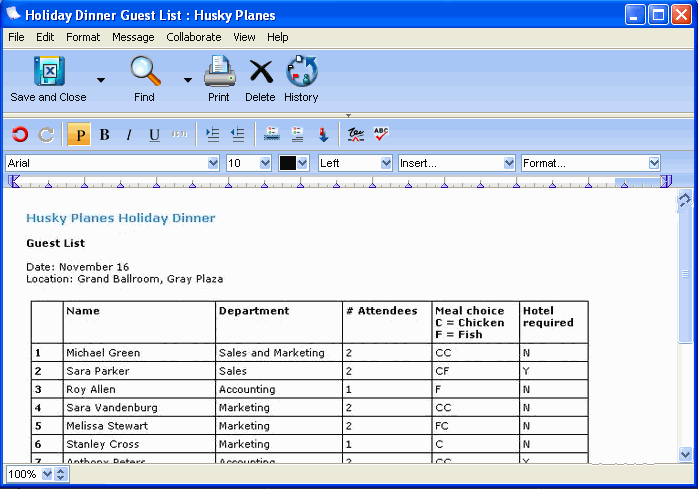
Sara Parker is the Event Coordinator at Husky Planes. She is planning the holiday dinner for the company, and is using a FirstClass document to manage the guest list.
She starts by creating a conference to manage details of the event. Then she sends a message to a public conference to let everyone know about the event and to let them know to RSVP to the conference she created.
As RSVPs come in, Sara manages them in a FirstClass document.
8102006_40703_0.png
She can refer to this document throughout the planning process as she organizes the different details, such as table seating, head count, and hotel bookings.